Ir para o conteúdo
Voltar ao catalogo
Avia.Systems.Scan2CAD v10.6.1
Avia Systems

Avia.Systems.Scan2CAD v10.6.1

Scan2CAD v10.6.1 converts raster images and PDFs to editable DWG, DXF, and G-code with OCR and batch processing.

10.6.1 Available Listing verificado
Acessar link

Sinais de confianca

Link Revisado
Dados Conferidos
Página SSL

Use apenas fontes confiaveis e confira a origem antes de instalar qualquer arquivo. Disponibilidade pode variar.

Sobre o software

Overview

Scan2CAD v10.6.1 is the world's leading software for automatic raster-to-vector (R2V) and PDF-to-CAD/CNC conversion. Developed by Avia Systems (UK) for over 20 years, it transforms scanned images (scans), PDFs, photographs, and image files into editable vector files: DXF, DWG, G-code, HPGL, SVG, CNC. It combines an advanced vectorization engine, technical OCR, batch processing, and raster image cleanup — all in an optimized workflow for engineering, architecture, manufacturing, and archive digitization.

Version 10.6.1 brings improved arc/circle vectorization precision, enhanced OCR for technical fonts, expanded support for mixed vector+raster PDFs, and compatibility with Windows 10/11 and macOS 14+ (Sonoma) with native Apple Silicon (M1/M2/M3) support. It is the standard tool for converting paper drawings, legacy plans, maps, logos, and technical documentation into CAD/CNC-ready files, eliminating hours of manual redrawing.

Core Capabilities

CapabilityDetails
Raster→Vector ConversionScans, PDFs, images to DXF, DWG, G-code, HPGL, SVG, vector PDF, CNC
Intelligent Recognition (AI)Lines, polylines, arcs, circles, ellipses, splines, hatches, texts, dimensions, arrows
PDF ImportExtracts both vector content (lines, text, fonts) and raster (embedded images) — preserves PDF layers
Technical OCR (Smart OCR)Recognizes dimension text, annotations, tables, legends in engineering/arch drawings → editable vector text (MText)
CNC ExportOptimized G-code for milling, laser, plasma, waterjet — pocketing, profiling, drilling, lead-in/out, tabs
Batch ProcessingConvert entire folders of images/PDFs with same parameters — multi-page PDF → multiple DXF/DWG/G-code
Raster CleanupDeskew, despeckle, threshold, thickening/thinning, hole fill, smooth — pre-processing for precise vectorization
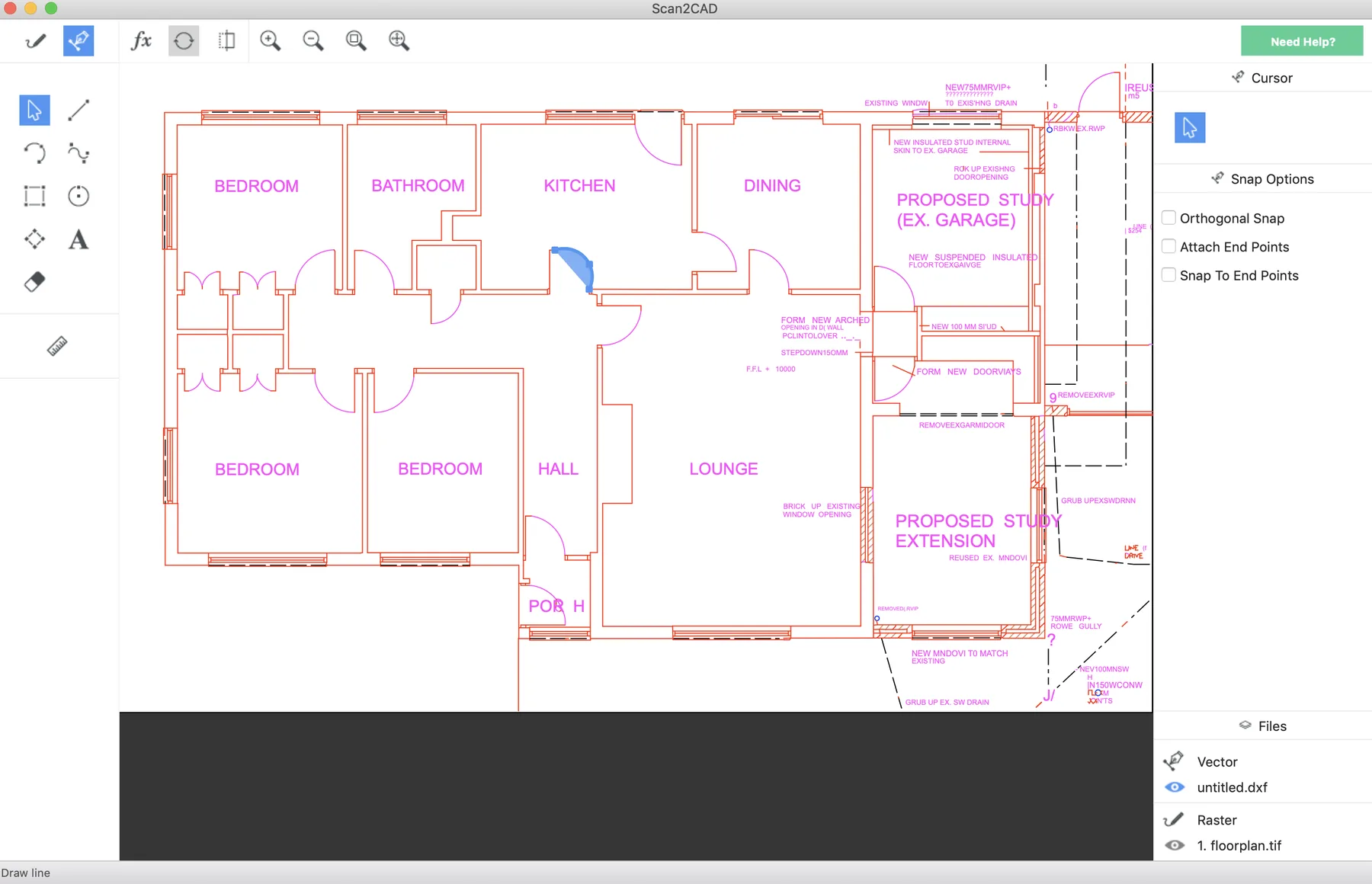
Side-by-Side PreviewRaster/vector overlay with synchronized zoom, before/after comparison, real-time parameter adjustment
Shape RecognitionDetects arrows, symbols, blocks, table cells → converts to reusable CAD blocks/entities
Scale CorrectionCalibration by known distance, DPI, drawing scale — ensures real-scale output (1:1, 1:50, 1:100, etc.)
Layer SupportPreserves PDF vector layers; creates layers by color/entity type in raster vectorization
AutomationCommand line / API for headless automation and pipeline integration (ERP, PDM, MES)

Why Professionals Choose Scan2CAD

Eliminates hours/days of manual redrawing of scanned plans — automatic conversion in minutes. Preserves original geometry with sub-pixel precision — true arcs, not approximated line segments. Output compatible with ALL CAD software: AutoCAD, Revit, SolidWorks, BricsCAD, ZWCAD, GstarCAD, Fusion 360, etc. CNC-ready: optimized G-code reduces material waste, machine time, and tool breakage. Batch processing scales to hundreds/thousands of files — entire archive digitization. Technical OCR reads dimensions and annotations — not just "text" but recoverable engineering information. Runs on modest hardware — no dedicated GPU needed, works on standard corporate laptops. Intuitive interface with step-by-step wizard — productive on first use, no formal training required.

CanalVIP: Organized Access & Support

CanalVIP organizes download links, technical information, and access guidance. Licenses, activations, plugins, and paid resources follow the terms of each vendor or distributor.
Principais recursos

  • 01 Raster-to-vector conversion with intelligent recognition: lines, polylines, arcs, circles, ellipses, splines, hatches, texts
  • 02 PDF import: extracts both vector content (lines, texts, fonts) and raster (embedded images) — preserves PDF layers
  • 03 Advanced technical OCR: recognizes dimension texts, annotations, tables, legends in engineering/architectural drawings — converts to editable vector text (MText)
  • 04 CNC export: optimized G-code for milling, laser, plasma, waterjet — pocketing, profiling, drilling, lead-in/out, tabs
  • 05 Batch processing: converts entire folders of images/PDFs with same parameters — multi-page PDF → multiple DXF/DWG/G-code
  • 06 Raster cleanup (Raster Cleanup): deskew, despeckle, threshold, thickening/thinning, hole fill, smooth — pre-processing for precise vectorization
  • 07 Side-by-side preview: raster/vector overlay with synchronized zoom, before/after comparison, real-time parameter adjustment
  • 08 Shape recognition: detects arrows, symbols, blocks, table cells — converts to reusable CAD blocks/entities
  • 09 Scale correction: calibration by known distance, DPI, drawing scale — guarantees real-scale output (1:1, 1:50, 1:100, etc.)
  • 10 Layer support: preserves PDF vector layers; creates layers by color/entity type in raster vectorization
  • 11 Portuguese (PT-BR) interface and multiple languages
  • 12 Command line / API for headless automation and pipeline integration (ERP, PDM, MES)

Beneficios

  • 01 Eliminates hours/days of manual redrawing of scanned plans — automatic conversion in minutes
  • 02 Preserves original geometry with sub-pixel precision — true arcs, not approximated line segments
  • 03 Output compatible with ALL CAD software: AutoCAD, Revit, SolidWorks, BricsCAD, ZWCAD, GstarCAD, Fusion 360, etc.
  • 04 CNC-ready: optimized G-code reduces material waste, machine time, and tool breakage
  • 05 Batch processing scales to hundreds/thousands of files — entire archive digitization
  • 06 Technical OCR reads dimensions and annotations — not just "text" but recoverable engineering information
  • 07 Runs on modest hardware — no dedicated GPU needed, works on standard corporate laptops
  • 08 Intuitive interface with step-by-step wizard — productive on first use, no formal training required

Requisitos

  • 01 OS Windows 10/11 64-bit (1809+) / macOS 14.0+ (Sonoma) / macOS 13 (Ventura) — native Apple Silicon (M1/M2/M3) and Intel support
  • 02 RAM 4 GB minimum / 8 GB recommended / 16 GB+ for batch of large files (multi-page PDFs, high-res TIFFs)
  • 03 CPU x86-64 dual-core 2.0 GHz+ / Apple Silicon M1/M2/M3 (any) — multi-core accelerates batch processing
  • 04 Disco 500 MB free for installation + temporary space for batch cache (SSD recommended)
  • 05 GPU No dedicated GPU required — CPU-based rendering; OpenGL 2.1+ for preview (any integrated/modern GPU); Display: 1366x768 minimum / 1920x1080+ recommended for comfortable side-by-side preview
  • 06 .NET No separate .NET Framework required (embedded runtime)
  • 07 License Standard (single machine) or Floating Network (LAN license server) — online/offline activation

Perguntas frequentes

Does Scan2CAD convert PDF to DWG?

Yes. Converts raster PDFs (scans), vector PDFs (exported from CAD), and mixed PDFs — extracts lines, arcs, texts, hatches, layers, and embedded images to editable DXF/DWG.

Does it work on macOS?

Yes. v10.6.1 has a native build for macOS 14+ (Sonoma) with Apple Silicon (M1/M2/M3) and Intel support. Identical functionality to Windows version.

Is it suitable for CNC?

Yes. Exports G-code (Fanuc, Siemens, Heidenhain, Mach3, LinuxCNC, GRBL, etc.) with pocketing, profiling, drilling, lead-in/out, tabs, path optimization. Used for milling, laser, plasma, waterjet, router CNC.

Does it need powerful hardware?

No. Modest requirements: 4 GB RAM, dual-core CPU, 500 MB disk. Dedicated GPU not required. Batch of large files benefits from more RAM/CPU/SSD.

Does it recognize text in technical drawings?

Yes. Advanced technical OCR reads CAD fonts (simplex, complex, ISO), dimensions, annotations, tables, legends — converts to editable MText in destination CAD.

Can it convert multiple files at once?

Yes. Batch conversion processes entire folders (including subfolders) or multi-page PDFs with same parameters. Command line/API for headless automation.

Is output compatible with AutoCAD/Revit/SolidWorks?

Yes. Generated DXF/DWG open natively in AutoCAD (all versions), Revit (link/import), SolidWorks, BricsCAD, ZWCAD, GstarCAD, Fusion 360, Onshape, FreeCAD, QCAD, etc.

Galeria

Softwares relacionados

Verificar VIP Canal público Solicitar Catálogo