
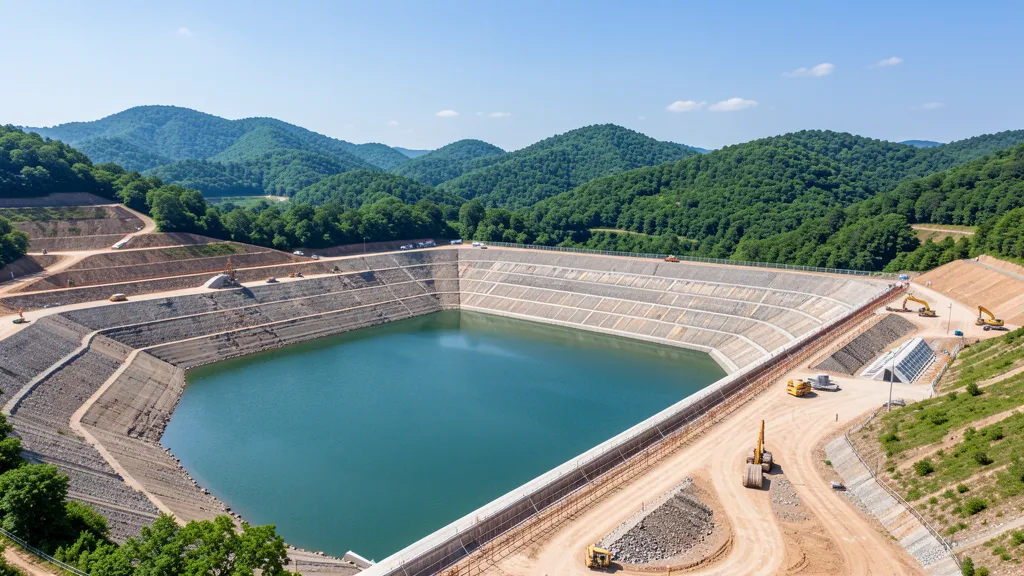
AutoCAD Civil 3D is Autodesk's most advanced tool for dam modeling in Civil 3D, allowing engineers to create everything from conceptual studies to complete executive designs. The conceptual modeling of earth and rockfill dams with water depth is one of the most powerful applications of the software, combining grading tools, feature lines and corridors to generate accurate three-dimensional models. This guide presents the essential techniques for mastering this workflow.
Conceptual Modeling of Dams in Civil 3D
Conceptual modeling of dam masses in Civil 3D involves representing the three-dimensional geometry of the dam body and the reservoir water surface. The objective is to analyze landfill volumes, check intersections with the natural terrain and visually validate the project before the executive phase.
- Feature Lines: Define the contour of the massif and the upstream and downstream elevations
- Grading: Parametric tool to create slopes with controlled angles and distances
- Corridors: Advanced method for complete parametric models with subassemblies
- Surfaces: Base for calculating volumes and generating cross sections
The inclusion of the water depth in the model makes it possible to visualize the maximum operational level and assists in determining the ideal height of the massif, width of the crest and inclination of the slopes.
Step by Step to Model the Massif with Water Slide
The modeling process follows a logical sequence that takes full advantage of Civil 3D's native tools. See the main steps:
1. Preparation of the natural terrain: Import the topographic surface of the location where the dam will be inserted. Use survey data or contours to create a reliable surface — the accuracy of this step defines the quality of the final result.
2. Definition of the axis and crest: Create an alignment that represents the centerline of the dam crest. This axis serves as a reference for the entire parametric model.
3. Creation of feature lines: Convert polylines to feature lines with defined elevations. The body of the dam is delimited by two parallel lines: the upstream face (facing the reservoir) and the downstream face.
4. Application of gradings on slopes: Use the Grading Creation Tools tool to generate the massif faces. Configure the slope of each slope according to the geotechnical project:
- Upstream slope: generally gentler, between 1V:2.5H and 1V:3H
- Downstream slope: can be steeper, between 1V:1.5H and 1V:2H
- Set the intersection distance with natural terrain using Daylight
5. Ridge Filler: After generating the two faces, use Create Grading Fill to fill the top of the dam between the crest feature lines, forming the complete horizontal surface.
6. Insertion of the water slide: Create a feature line at the maximum operational level (maximum N.A.) and use it as the basis for a surface representing the reservoir. This allows you to view the water mirror integrated into the massif model.
7. Calculation of volumes: Use the Volumes Dashboard to compare the surface of the designed massif with the natural terrain. Civil 3D automatically calculates the necessary landfill volumes, essential for budgets and construction planning.
Advantages of Civil 3D for Dam Projects
AutoCAD Civil 3D offers significant advantages for engineers working on dam and water infrastructure projects. Full model parameterization allows changes to the axis or dimensions to automatically update all sections, profiles and volumes. Integration with the BIM flow facilitates collaboration between geotechnical, hydrology and structure teams. Furthermore, technical documentation is generated directly from the 3D model, reducing compatibility errors and speeding up the approval process.
How to Purchase AutoCAD Civil 3D
To start modeling dams and other infrastructure projects in AutoCAD Civil 3D, purchase your license at CanalVIP catalog. We offer the best conditions for engineers and design offices who need Autodesk tools to increase the quality of their infrastructure projects.